
TIA Portal import
The editor reads a TIA Portal project directly: PLCs, tag tables and data blocks. No Excel export is needed.
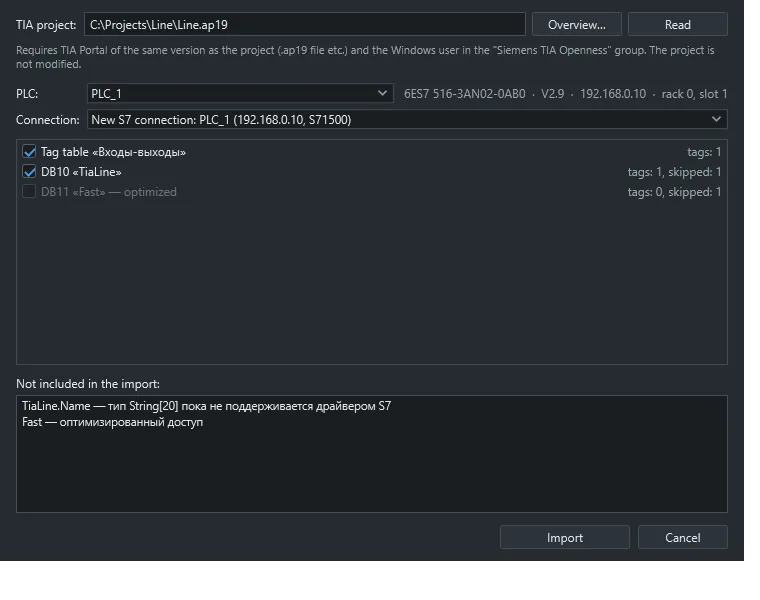
What you need
Section titled “What you need”- TIA Portal installed with the Openness component. Tested on V19.
- TIA Portal asks for access on first use. Confirm the prompt.
- In the editor, choose the TIA Portal project import command or the TIA toolbar button.
- Pick the project file and press Read.
- Choose a PLC and a connection, new or existing.
- Tick the sources and run the import.
The whole import is one undo step. A new S7 connection takes its address, CPU type, rack and slot from the project. Re-importing updates tags by name.
How data is mapped
Section titled “How data is mapped”- Arrays expand to
Name_itags, up to 1000 elements. - UDT fields become separate tags.
String[n],WString,Char,WChar,DTL,DT,Date,TODandS5Timeget addresses in the matching format.- Write access comes from attributes:
SetPointmeans engineer, no external write means read-only, and inputs are read-only.
Optimized blocks have no absolute offsets, so they appear in the skipped list. Turn off optimized access for them or use OPC UA.
If the project is already open in TIA Portal, the editor attaches to that instance. Otherwise it opens the project without a user interface and closes it without saving.