
SCADA for Siemens S7 PLCs
Scadora talks to S7-300, S7-400, S7-1200 and S7-1500 controllers and reads tags directly from a TIA Portal project, with no Excel export in between.
Tags from TIA Portal in one step
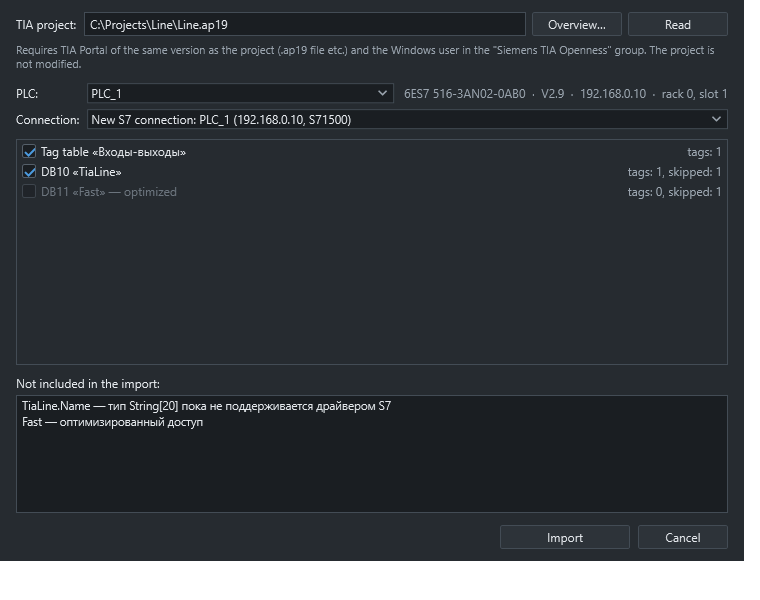
Point the editor at a project folder. It reads the PLC, tag tables and data blocks, then creates the S7 connection with its address, CPU type, rack and slot. Tested with TIA Portal V19.
- Arrays expand into separate tags
- UDT fields become tags with real offsets
- Re-import updates existing tags by name
- Anything that cannot be imported is listed
Address formats
- Address
- Meaning
- DB1.DBX0.1
- Data block bit
- DB1.DBW4, DB1.DBD8
- Word, double word
- M10.0, I0.0, QW2
- Memory, inputs, outputs
- DB1.STRING10.20
- STRING[20] at offset 10
- DB1.WSTRING40.20
- WSTRING[20]
- DB1.DTL20, DB1.TOD42
- Date and time types
- DB1.S5TIME46
- S5TIME in milliseconds
What the PLC needs
The driver uses absolute addressing. On S7-1200 and S7-1500, enable PUT/GET access and turn off optimized access for the data blocks you read. For optimized blocks, connect through OPC UA instead.